
Call us now :07313725989
 Send Inquiry
 Send Inquiry
Leave Management Software
MOQ : 1 Set
Leave Management Software Specification
- Training
- Available (online material and sessions)
- Mobile Compatibility
- Android & iOS supported
- Audit Trail
- Activity logging
- Features
- Automated leave request, Approval workflow, Leave balance calculation
- Update Frequency
- Regular automatic updates
- Access Control
- Role-based permissions
- Reports
- Customizable Leave Reports
- Product Name
- Leave Management Software
- Integration
- Payroll, Attendance, HRMS
- Type
- Human Resource Management
- Backup
- Automated daily backup
- Application
- Leave Tracking and Approval
- Deployment
- Cloud / On-premise
- Data Security
- SSL Encryption
- API Availability
- RESTful APIs for integration
- Data Export
- CSV, Excel formats
- Language Support
- Multi-Language
- System Requirements
- Any modern browser (Chrome, Firefox, Edge, Safari)
- Self-Service Portal
- Employee access to apply/view leaves
- Support
- Email, Phone, Online
- Platform
- Web-Based
- User Interface
- Intuitive and user-friendly
- Custom Workflow
- Configurable approval stages
- Notification
- Email and SMS alerts
Leave Management Software Trade Information
- Minimum Order Quantity
- 1 Set
- Supply Ability
- 1 Set Per Week
- Delivery Time
- 7 Days
About Leave Management Software
Leave Management Software
Highly suitable for big, medium and small enterprises, this leave management software are offered by us. It is used for keeping records of leaves taken by the employees. This program has user friendly interface can be accessed by the employees and administration for submitting leave applications as well as for viewing leave balance. These are offered in market reasonable prices to the customers.
WEB BASED LEAVE MANAGEMENT SYSTEM
- Front End - ASP.net, C#, Backend - SQL
- Multi-user - Leave, OD Input etc
- Leave Availing, Leave Crediting Rules
- Email to HOD and Online Approval, Rejection, Hold Facility
- Admin, User and Self Employee Options
- Self Employee Service Option - Leave, OD, Leave Balance & Report View etc
- Suitable for Large Organisations
Effortless Leave Management Anytime, Anywhere
Employees and managers can access leave functionalities from web browsers or mobile devices on both Android and iOS platforms. The self-service portal empowers users to easily apply for leave, track balances, and view application status, ensuring operational efficiency no matter their location.
Custom Approval Workflows to Suit Your Organization
Configure multi-level approval stages and tailor workflows to match your company policies. Role-based permissions simplify the process, streamline approvals, and maintain control over who can access, approve, or manage leave requests, adapting perfectly to organizational hierarchy.
Comprehensive Data Security and Reliable Backup
Our software employs SSL encryption for secure data transmission and automated daily backups to safeguard your information. Audit trail logs all activities for accountability, and regular updates ensure the system remains protected against emerging threats.
FAQs of Leave Management Software:
Q: How do employees apply for leave using the Leave Management Software?
A: Employees can apply for leave directly through the intuitive self-service portal, accessible via any modern browser or the mobile app supported on Android and iOS. The system facilitates easy submission and allows users to track the status of their applications.Q: What custom workflow features are available for leave approvals?
A: The software provides a fully configurable approval workflow, allowing organizations to define multiple approval stages. Workflows can be tailored according to policies and organizational structure, ensuring each request follows the designated path before final approval.Q: When are notifications sent for leave-related actions?
A: Notifications are automatically triggered when a leave request is submitted, approved, or rejected. Users receive real-time alerts via email and SMS, keeping all stakeholders promptly informed about relevant updates.Q: Where can leave records and audit trails be accessed?
A: Managers and authorized users with appropriate permissions can view comprehensive activity logs and leave records within the application. Data can be exported in CSV or Excel format for reporting or compliance purposes.Q: What steps are involved in integrating Leave Management Software with other HR tools?
A: Integration is facilitated via RESTful APIs, enabling seamless connectivity with payroll, attendance, or existing HRMS systems. The process is straightforward and supported by detailed documentation and technical assistance if required.Q: How does the automated backup benefit our organization?
A: Automated daily backups ensure company leave data is regularly saved and safeguarded against accidental loss or hardware failure. This provides peace of mind and simplifies data recovery in unforeseen circumstances.Q: What support and training options are available for users?
A: The service provider in India offers comprehensive support via email, phone, and online channels. Training is provided through online materials and dedicated sessions, assisting users in smooth onboarding and effective software utilization.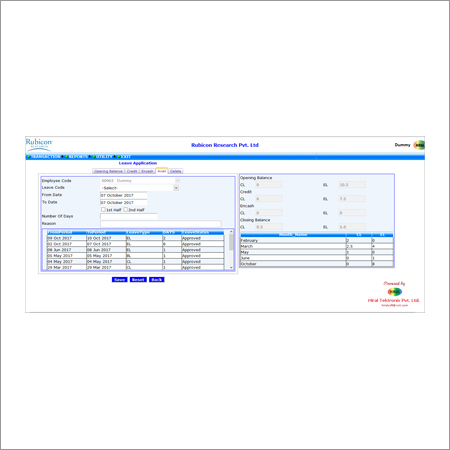
Tell us about your requirement

Price:
Quantity
Select Unit
- 50
- 100
- 200
- 250
- 500
- 1000+
Additional detail
Mobile number
Email

More Products in Management Software Category


 Send Inquiry
Our Products
- Access Control Software Development
- Management Software
- Fingerprint Time Attendance Machine
- Access Control Management System
- Video Door Phone
- Handheld Metal Detectors
- Security System
- Time Attendance System
- Access Control System
- UHF Car Detector
- Payroll Software
- DVR-NVR System
- Human Resource Management System
- Guard Patrolling Unit
- Smart Card Writer
- Attendance Recording Software Development
- Biometric Fingerprint Attendance System
- Biometric Access Control System
- Face Reader
- Barcode Scanner
- Sliding Gate
- Door Frame Metal Detector
- Flap Barrier
- Boom Barrier
- Dome Camera


507, Runwal R-Square, LBS Marg, Mulund (West), Mumbai - 400080, Maharashtra, India

Mr Mahesh L. Lodaya
(DIRECTOR)
Mobile :07313725989
 Send Inquiry
 Send SMS
 Call Me Free
Developed and Managed by Infocom Network Private Limited.


